Showing posts with label Google Apps script. Show all posts
Process owners should work on improving the operation of their workflows. If forgotten and neglected after being designed, workflows will not function smoothly.

In today's sample workflow, the process owner uploads exemplary responses to the FAQ page, and customer service members use these as reference. If this cycle continues, the response time should be reduced over time. It's also a good idea to share Kaizen goals with the team, such as "This month we want to break the 10-hour average response time. Next month, 8 hours!"

(Related articles)
"How to Measure Inquiry Response Speed"
"If You Want to Assign Respondents Based on the Inquiry Content"
"If You Want to Assign Respondents Based on the Type of Inquiry"


Companies that handle over 100 inquiries a day should think about how to categorize them. If you can tell at an early stage what product an inquiry concerns, this should influence the ensuing route and specified respondent (probably).

Today's workflow assumes the inquirer chooses the category himself. But the leader can change this at the second task (Specify Respondent).

(Spin-off from "How to Measure Inquiry Response Speed" and "If You Want to Assign Respondents Based on the Inquiry Content.")


Yesterday's workflow ("How to Measure Inquiry Response Speed") was very simple and easy. Top management can see which staff member is currently in charge of what inquiry, and each staff member can see exactly how many inquiries he has to handle. But when you try to put it to use you'll probably find issues that need to be worked through.

For example, if the customer service team is composed of ten employees who also have other duties, the second task (Specify Respondent) may become a fierce battlefield of bartering. When this is the case, it would be better if only employees with manager positions can see this phase. In other words, the boss distributes work based on each member's expertise, work load and training opportunities. In today's workflow, the second task only goes to the leader of the customer service team. (There should probably be several leaders, to make sure unanswered inquiries don't build up.)


How to Measure Inquiry Response Speed

Friday, February 25, 2011
The inquiry response workflow is a great place to start Business Process Management (BPM). This is because a lot of companies aren't sure about things like, how long it takes on average for their employees to respond to external inquiries, what kind of inquiries are made frequently, or how these inquiries are responded to. These questions are often raised in board meetings, and the answer is usually, "I'll find out by the next meeting." Wouldn't it feel good to be able to say, "Here, I can show you right now"?

But, as preparation, here is a sample workflow for responding to internal inquiries. (Starting too big is a recipe for disaster.)


Everyone has different standards on when exactly something crosses that "no longer usable" line. This applies to a company's fixed assets as well.

What we are trying to say is that it may be good to have two people conduct the same investigation on fixed assets. These investigations usually don't take that much time, so this should not be unreasonable. (Spin-off from "Taking on Management of IFRS Related Workflows" and "Accommodating Manager Changes in Asset Investigations.")


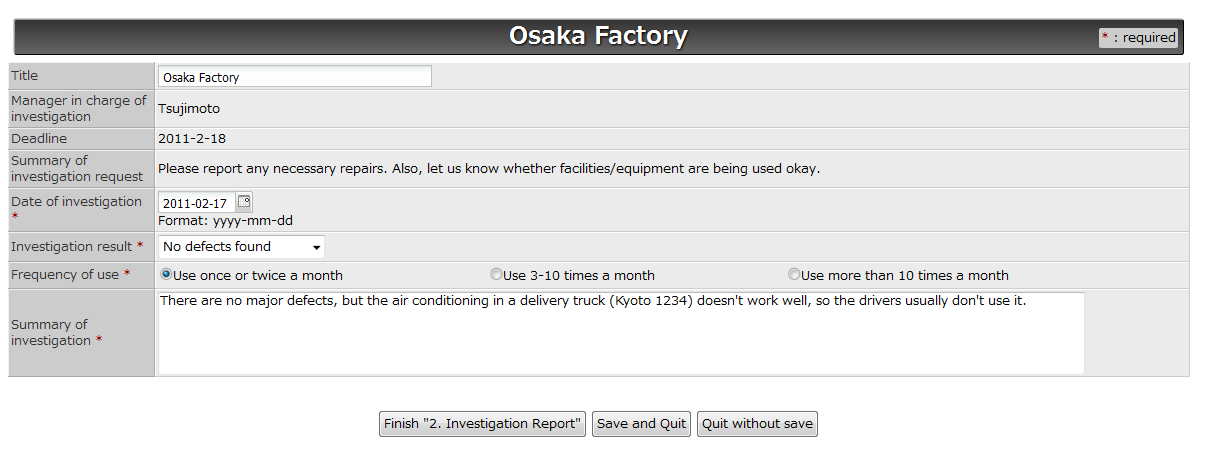
In yesterday's post, "Taking on Management of IFRS Related Workflows," we presented a workflow for investigating fixed asset management. Companies that have many fixed assets may find that the manager listed in the fixed asset ledger (person in charge of investigation) has changed. If you want to take these cases into account, you can divide the investigation task into two tasks (2a. Start Investigation and 2b. Investigation Report), and enable the first person to assign the second task to another person.


There are tons of workflows related to the International Financial Reporting Standards (IFRS). For instance, IAS 36: Impairment of Assets and IAS 11: Construction Contracts (percentage-of-completion method) require the collection of data from employees.

Today's workflow is for periodically checking whether the company's assets are significantly impaired (finding indications of impairment). In simple terms, conducting checkups to make sure facilities and equipment are operating properly, and this requires employee cooperation.


Our previous articles "Managing a List of Paying Members on the Cloud" and "How About Including the Task of Removing Members?" talked about sending reminder emails to alumni until they pay their class dues.

The samples we introduced allow you to handle entire lists of memberships all at once, but some organizations may have to send out transfer slips via land mail, if a considerable portion of their membership register with regular street addresses instead of email addresses.


We introduced a workflow for "Managing a List of Paying Members on the Cloud", where you keep sending members reminder emails and check them off as they pay. But you can't keep sending reminders until the end of time; in reality you will have to eventually remove those that never pay, for example when the next payment timing comes around.
If you want an all-around process you can add a "remove name from list" task at the end.


Yesterday we introduced a workflow that lets accounting remind production to start the invoice issuance process, in order to eliminate delays and omissions. ("Cross-Sectional Collaborative Workflow for Invoice Issuance") This workflow is made of human-tasks.

Another step towards eliminating delays and omissions is to automate processes via system integration. In the below workflow let's look at a way to automate "Task 0. Remind Invoice Request."


Regardless of how meticulous and intensive preparations and tests are, the moment a new website is launched is a moment of acute emotional tension. It is impossible to create a test environment that is truly 100% identical to the final real environment. This means defects that occur only after actual launch are unavoidable.

The important thing is to handle these defects efficiently, with relevant priority, and calmly.


For contract-based companies, getting that final acceptance receipt is one of the biggest goals. Whether it's web design or system development, some may argue that a major part of our efforts are focused on that final okay.

When considering the overall project it's important to bring the workflow to a completed "acceptance inspection," as we already mentioned in "Settling Specs Between Two Companies." But in reality that final step is not always smooth going. It's often the case that the client requests corrections to the final product in a few places, or 10 places, or 50. In any case it's crucial to clearly understand each correction and get them fixed.


There is a huge demand to link Google Docs spreadsheet forms with workflows. This is because it is a great way to deal with a collection of data, from managing customer info to making a list of people coming to the next company party.

Today let's think about communicating with 100 people. You can easily send one question to 100 people with one email, but it would be much better to have them respond to a webform instead of reply to the email directly. Unless, that is, you like having 100 separate emails coming into your in-box, one by one...


Smooth and Speedy Complaint Management

Thursday, November 25, 2010
Whether you're impulse is to ignore their existence or to brag about the amount of them, complaints are disguised opportunities for improving products and services. Companies should record each complaint in order to analyze the cause for each one and grasp comprehensive relations. Nowadays there is the popular webform which can be accessed by anyone at anytime, so companies will want to prepare a system to receive them and respond to them quickly.

Let's say we make a webform in Google Docs, and design a workflow for responding to issued complaints.


If a company has a system in which work comes in from external sources, the internal process for handling that work inevitably goes through a continuous cycle of improvement. In other words, processes that are initiated externally are what aids an organization's ability to adopt to external environments. (external as in: outside the company, outside the division, outside the team, the person sitting next to you...)

This is a workflow that automatically handles inquiries (jobs) that are inputted in a Google Docs spreadsheet form. There is a split for when the member needs accounting's advice.