Showing posts with label Resource management. Show all posts

For a business system that is used every day, it is very important for users whether the input interface (input screen) is easy to understand and whether it is easy to use.

Relating a Workflow system, I often hear people saying such as;

  •  "I don't know what to input."
  • "It could be easier if there were examples or templates."
  • "I entered all the way, but it ended up as an error."
  • "The way of input varies depending on individuals."

And when I look back at our day-to-day operations, such as "Report of hours worked", "Request for approval", "Report of order receipt", "Answer to inquiries", etc., many of the occurrences of delays and reworks are mostly caused by erroneous or inappropriate input at upstream Steps.

"Improvement of work" tends to be a grandiose story such as standardization of business flow and optimal placement of resources, but as the content to be tackled becomes bigger, it takes time to get the effect. On the other hand, it can be said that "devising the input screen to reduce inputs that is erroneous and inappropriate" is a small "business improvement" that can be addressed immediately in daily work. Iterating small improvements will lead to major achievements.

In this workflow sample, I would like to introduce you the devising of "input example button" on an input screen, which allows input by clicking on it.


[Test flow for Input form]


[Test flow for Input form: "1. Input Test" screen]


When designing the input screen, it is basically necessary to set a "Data Item name" that is easy to understand, and to describe sentences and examples (Input hint) that explain how to input. Furthermore, by making it possible to select by option instead of typing, or by setting the initial value of data, the burden of inputting for a user is reduced and it also leads to suppression of variations in input data.

In addition to these means, it is also a good idea to consider using scripts such as arranging buttons for input assistance or performing input checking or setting data to other Data Items.

Even though you can set arbitrary HTML/JavaScript in [Input hint] of Questetra, in some cases it may be a trouble such as "it will destroy the layout of the whole input form". It must be set by staff members who have knowledge and experiences of HTML/JavaScript at their own risk within the range of their capability of maintenance.

▼[Input Hint] Setting Example (HTML/JavaScript):"Service Item"
E.g.: <button type="button" id="btnConsultant_1">Monthly advisory fee</button>、
<button type="button" id="btnInstruct_1">Workshop instructor fee (Diem)</button>、
<button type="button" id="btnDoc_1">Documentation fee</button>

<script type="text/javascript">
jQuery('#btnConsultant_1').on('click',function(){
jQuery('input[name="data\\[1\\].input"]').val( "Monthly advisory fee" );
});
jQuery('#btnInstruct_1').on('click',function(){
jQuery('input[name="data\\[1\\].input"]').val( "Workshop instructor fee (Diem)" );
});
jQuery('#btnDoc_1').on('click',function(){
jQuery('input[name="data\\[1\\].input"]').val( "Documentation fee" );
});
</script>
▼[Input Hint] Setting Example (HTML/JavaScript):"Quotation price"
E.g.: <button type="button" id="btnS_2">(15 years career) 820,000</button>、
<button type="button" id="btnA_2">(5 years career) 452,000</button>、
<button type="button" id="btnB_2">(Less than 15 years) 339,000</button>

<script type="text/javascript">
jQuery('#btnS_2').on('click',function(){
jQuery('input[name="data\\[2\\].input"]').val( "820000" );
});
jQuery('#btnA_2').on('click',function(){
jQuery('input[name="data\\[2\\].input"]').val( "452000" );
});
jQuery('#btnB_2').on('click',function(){
jQuery('input[name="data\\[2\\].input"]').val( "339000" );
});
jQuery('input[name="data\\[2\\].input"]').parent().parent().css("background-color","#FFC0CB");
</script>
▼[Input Hint] Setting Example (HTML/JavaScript):"Reason for Leave"
E.g.: <button type="button" id="btn1_5">Leisure and Home matter: Private</button>、
<button type="button" id="btn2_5">Local volunteer: Private (Local volunteer)</button>、
<button type="button" id="btn3_5">Got abdominal pain in the morning: Illness (abdominal pain)</button>、
<button type="button" id="btn4_5">Child's fever: Child care</button>

<script type="text/javascript">
jQuery('#btn1_5').on('click',function(){
jQuery('input[name="data\\[5\\].input"]').val( "Private" );
});
jQuery('#btn2_5').on('click',function(){
jQuery('input[name="data\\[5\\].input"]').val( "Private (Local volunteer)" );
});
jQuery('#btn3_5').on('click',function(){
jQuery('input[name="data\\[5\\].input"]').val( "Illness (abdominal pain)" );
});
jQuery('#btn4_5').on('click',function(){
jQuery('input[name="data\\[5\\].input"]').val( "Child care" );
});
</script>
▼[Input Hint] Setting Example (HTML/JavaScript):"Approval request overview" "Budget classification"
Frequent: <button type="button" id="btnExhibit_78">(Exhibitions within budget)</button>、
<button type="button" id="btnProcurement_78">(Unexpected procurement)</button>

<script type="text/javascript">
jQuery('#btnExhibit_78').on('click',function(){
jQuery('input[name="data\\[7\\].input"]').val( "Outsourcing related to the Cloud Expo" );
jQuery('input[name="data\\[8\\].selects"][value="1"]').prop('checked', true);
});
jQuery('#btnProcurement_78').on('click',function(){
jQuery('input[name="data\\[7\\].input"]').val( "Purchase of personal computers due to breakdown" );
jQuery('input[name="data\\[8\\].selects"][value="3"]').prop('checked', true);
});
</script>
▼[Input Hint] Setting Example (HTML/JavaScript):"Reason of request"
<span style='color:#ff0000;'>* Brief in Bullet</span><br>
E.g.: <button type="button" id="btnReasonA_9">(P.C. breakdown)</button>、
<button type="button" id="btnReasonB_9">(Abrupt procurement due to the increase of personnel)</button>、
<script type="text/javascript">
jQuery('#btnReasonA_9').on('click',function(){
var myReason = "";
myReason += "External Monitor output is corrupted by the dropping in transportation (Dec. 2015)\n";
myReason += "Hindrance to the operation of the latest OS, past more than three years since the purchase of January 2013.\n";
myReason += "Choose a familiar conventional series machine, even though D Company is not the lowest price, but the difference is small.";
jQuery('textarea[name="data\\[9\\].input"]').val( myReason );
});

jQuery('#btnReasonB_9').on('click',function(){
var myReason = "";
myReason += "Increase 30 part-timers to correspond due to receiving order of more than assumed.\n";
myReason += "20 spare PC. Need 10 more.\n";
myReason += "(D company is the cheapest and fastest.)";
jQuery('textarea[name="data\\[9\\].input"]').val( myReason );
});
</script>
▼[Input Hint] Setting Example (HTML/JavaScript):"Service start"
<button type="button" id="btnThisMon_11">This month</button>、
<button type="button" id="btnNextMon_11">Next month</button>

<script type="text/javascript">
jQuery('#btnThisMon_11').on('click',function(){
var myToday = new Date();
var y = myToday.getFullYear();
var m = myToday.getMonth() + 1; // Jan: 0
if (m < 10) { m = '0' + m; }
jQuery('input[name="data\\[11\\].input"]').val( y + "-" + m );
});
jQuery('#btnNextMon_11').on('click',function(){
var myToday2 = new Date();
myToday2.setDate(1);
myToday2.setMonth(myToday2.getMonth() + 1);
var y2 = myToday2.getFullYear();
var m2 = myToday2.getMonth() + 1; // Jan: 0
if (m2 < 10) { m2 = '0' + m2; }
jQuery('input[name="data\\[11\\].input"]').val( y2 + "-" + m2 );
});
</script>
▼[Input Hint] Setting Example (HTML/JavaScript):"Service end"
<button type="button" id="btnOneYear_12">→1 year cintract</button>、
<button type="button" id="btnTwoYear_12">→2 years contract</button>

<script type="text/javascript">
jQuery('#btnOneYear_12').on('click',function(){
var myDateStr = jQuery('input[name="data\\[11\\].input"]').val();
var myStartMon = new Date( myDateStr + "-01");
var myEndMon = new Date();
myEndMon.setMonth( myStartMon.getMonth() + 11 );
var y = myEndMon.getFullYear();
var m = myEndMon.getMonth() + 1; // Jan: 0
if (m < 10) { m = '0' + m; }
jQuery('input[name="data\\[12\\].input"]').val( y + "-" + m );
});
jQuery('#btnTwoYear_12').on('click',function(){
var myDateStr = jQuery('input[name="data\\[11\\].input"]').val();
var myStartMon = new Date( myDateStr + "-01");
var myEndMon = new Date();
myEndMon.setMonth( myStartMon.getMonth() + 23 );
var y = myEndMon.getFullYear();
var m = myEndMon.getMonth() + 1; // Jan: 0
if (m < 10) { m = '0' + m; }
jQuery('input[name="data\\[12\\].input"]').val( y + "-" + m );
});
</script>
[Data Item list]

Similar Models

Related Articles


Free download Business Template : Test flow for Input form

(Japanese Entry (ε’Œζ–‡θ¨˜δΊ‹))
Concerning "Designation in Uneven Hierarchy", we learned methods for "Absolute designation according to the job title, "Relative designation according to organization hierarchy, and "Methods of separating business processes, designating approver".

As the last of this series, I will introduce a past article that describes "Method of separating the starting position according to job position".

Even though it is a similar idea to "Method of separating business processes", it addresses by separating the start position in one business process in this article. Although it is a "method of starting by boss" instead of "method of designating boss", please keep it in your memory as one of the methods of designing a Workflow App for an organization with variations in its hierarchy.

Regarding designation within an organization in which its hierarchy is uneven, we studied "method of absolute specification by job title" in Part 1, and "method of relative designation according to organization hierarchy" in Part 2.

Both methods have advantages and disadvantages, and approver/decision-makers are needed to be careful during operation. After all, in the case of "an organization with unevenness in depth", it is difficult to simply describe business rules.

The easy-to-use and easy-to-operate Workflow (setting method) will also vary depending on the size of the organization or proficiency to business rules/system of the organization members, and so on. Although we will introduce two more Workflows this time, please consider and choose "which description method is easy to operate without misunderstanding" according to the actual situation of each company including those introduced in the past articles.

One way is to separate the Workflows according to the requester.
In other words, if the approval route differs depending on the job title of who made a request, it may be good to separate into different Workflows.

[Approval flow (Separate the request of the Manager)]


Continuing from the last week, let's study about "Operator setting".

In the article of "Episode 587: Designation in Uneven Hierarchy, part 1", I introduced you a method of two-step approval which is to obtain an approval from "superior" then obtain from the "superior's superior". It is a form of approval flow that is common even for other than decision-making. This time, I will introduce a different way of writing about the previous Workflow diagram.

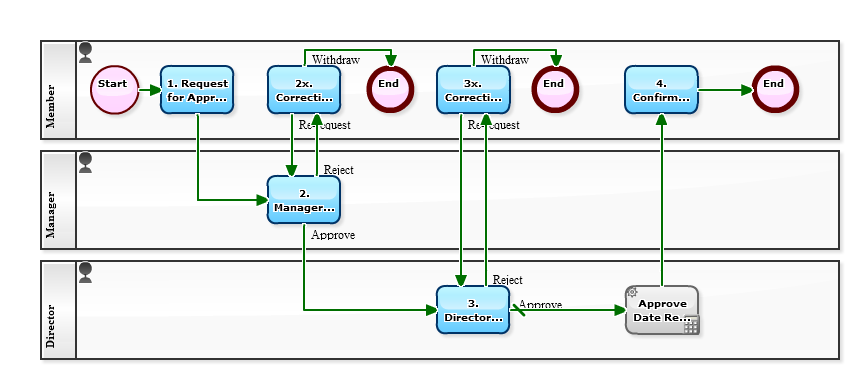
In the following Workflow diagram, the second Swimlane is set to "superior of the applicant" (relative designation), instead of "manager" (absolute designation by position).
By setting like this, "2. Approval/Decision" task will be assigned to the manager of the organization to which the applicant belongs. That is, if a "member" among "two directors, ten managers, and fifty members" makes a request then a "manager" approves on it, and if "manager" makes, "director" approves it.

[Approval flow (relative representation)]


Let's study about "Operator setting" from popular articles of the past.
To specify a "superior" is comparably difficult among settings of a Workflow since there are several ways to do and also it depends on the organization structure. It is better to know various ways of thinking at first.

One President, two (executive) Directors, four managers, and twelve employees.
Suppose that 4 of the "12 employees" are assigned to "directly under the Directors". More specifically,

  • 2 people are directly assigned respectively to the Departments where each of two directors supervises.
  • 2 people are assigned respectively to the Units where each of 4 managers supervises.

Every "Units" are belonging to either of the "Departments", of course. Specifically, It is a case of where the sales manager himself directly directs five sales staff members besides Units under the umbrella of the sales department. And while there are many Units under the affiliation of the manufacturing department, the manufacturing department manager himself is directly supervising five people as quality control staff.


The characteristic of this organizational structure is that there is "variation in depth". It is a common story.

Now, in the case of such "organization having variations in depth", what kind of business flow diagram should be to express the path of escalation in the approval flow? Let's consider how to write according to international standard notation BPMN. The point where to be controversial is how to draw an in-house rule that is "In principle, after the manager approval, the director will make a decision". That is, those five people in each department in this organization have no Manager.


[Approval flow (absolute representation 1)]


Continuing the past two weeks, I will introduce you the operation of "Starter Template" which has been pre-installed in the cloud-based Workflow, "Questetra BPM Suite".

The third one is "Out-of-pocket Expenses reimbursement claim".
Episode 464: Out-of-pocket Expenses Reimbursement Claim (Starter Template) (2016-01-04)

It is a business flow to make an application for claiming with email attachment of images of receipts taken with a mobile camera. And there is a focus on making it easier to manage receipt images by applying sequentially. Therefore, this will be a business process which is on the premise that "regulation that allows discarding the original paper receipt by taking a receipt image with a mobile camera".

[Out-of-pocket Expenses claim]


Continuing from the last week, I will introduce you the operation of "Starter Template" which has been pre-installed in the cloud-based Workflow, "Questetra BPM Suite".

The second one is "Procurement Request".
Episode 463: Procurement Request (Starter Template) (2015-12-28)

It is a business flow that allows anyone to make requests for purchasing from consumables to equipment as long as they are employees. Since status management such as "Decision pending " or "Delivery waiting" is automated, you can check progress at any time.

[Procurement Request flow]


In the article of "Episode 577: Work Request Flow is the Basic of Workflow", I introduced you the "Work Request flow" as an operation that I can recommend for any organization. It is one of the business flows (applications) pre-installed in the cloud-based Workflow "Questetra BPM Suite", and there three other business flows are pre-installed. I will introduce you the operation of "Starter Template pack" in three articles in series from this one.

The first installment is "Approval flow".
Episode 462: Planning - Approval (Starter Template) (2015-12-21)

It is a simple business flow in which an employee "applies" a request for approval and the superior of the applicant "approves" it. The flow has been configured that if the external payment amount is 1 million JPY or more, it goes also to the "Approval" by the officer. (Automatically be approved after neglected for 24 hours)


[Planning-Approval flow] 


Operation: Reporting and Reimbursement of Expense

We have realized systematization of "Expense report flow" in cloud based Workflow! (see Episode 559: Reason for Not Using Cloud Expense Management System)

We have introduced a mechanism to realize "multilateral grouping" (clustering)! (see Episode 560: Reason for Not Using Cloud Expense Management System (2))

We have implemented a mechanism for real time appending to Spreadsheet! (see Episode 561: Reason for Not Using Cloud Expense Management System (3))

Challenge: Unawared Date mistake

However, "challenges to be solved" appears one after another...

"Input mistake" began to be prominent from about the third month after implementation, when people got accustomed to expense reporting. It might be because they make reports by reusing past data, "date errors" are found frequently.

The president would wonder "How could the date be remained mistaken? Despite confirmed by the section chief, the director, and the accounting!"

Certainly, "the date of payment" is a very important data item. It also serves as the data for determining the aggregation month of the monthly trial balance. Nonetheless, a section chief or department manager have plenty of check items to check... Even if "2017-11-20" was mistaken as "2016-11-20", they would "approve" it not noticing the mistake. There are only "6 items". So it's quite conspicuous if the date is wrong. (It sure is a trouble!)
  • A) Payment date
  • B) Record month
  • C) Accounts classification
  • D) Settlement amount
  • E) Assignment of claimer
  • F) Decision ID

[Expense Report flow-Input Check]


Operation: Reporting and Reimbursement of Expense

We have realized systematization of "Expense report flow" in cloud based Workflow! (see Episode 559: Reason for Not Using Cloud Expense Management System)

Moreover, we have introduced a mechanism to realize "multilateral grouping" (clustering)! (see Episode 560: Reason for Not Using Cloud Expense Management System (2))

Staffs in the Accounting team says they are turning their eyes on expense reports on which the rule "deemed to be approved by manager after 48 hours remaining automatically" has been applied.

Challenge: Sharing data with audit corporation

However, for the amount of information, it is not "the more, the better."

In the workflow, various kinds of data are included not only basic information such as "reimbursement amount" and "posting month" but also "person / time who made report", "document certifying payment", "project name" or "client company name". Certainly it is an important job to extract "information" from various data if it is a person inside a company.

Whereas, to an accounting auditor for example, "process of approval" and "time required" are unnecessary data. Or, for top executives such as a president and a board officer, there is no time to check "who spent a lot of expenses". For these people, it is more important to have the necessary data listed briefly, than "multilateral aggregate filtering".

Hmm, then should I "handcraft" the Spreadsheet for reporting?

[Expense Report flow-Spreadsheet]


Operation: Reporting and Reimbursement of Expense

We have realized systematization of "Expense Report flow" in cloud based workflow! (See Episode 559)

Primarily, various other "Business flow definitions" are set in the Workflow platform. Therefore, it is not necessary to re-log in to the "system for expense settlement" even for expense reporting.

Moreover, the stagnation situation in Steps such as "Section manager approval" and "Department manager approval" is visualized on the Business flow diagram. The employee who makes report for, the boss who approves on it, and the directors, everybody makes confirmation about "what kind of report is on which Step" occasionally! And there increase cases where advice and comments about others' output are given! As you see, knowing "where the bottleneck for stagnation is" Is really important!

Challenge: Real Time Aggregation

However, it is somewhat doubtful about "whether the settlement list and the total settlement amount are accurately recognized?"

In other words, there are also mixed a large number of applications that ended up as "cancellation of expense reporting". Just simply aggregating all reports will not be the "accurate total expense".

Well, should I better using "expenses settlement cloud" which is specialized for expense settlement work?

[Expense Report flow-Status Control]


Operation: Reporting and reimbursement of expense

So-called "cloud expense management" is easy for system introduction.

Since it is a system specialized in management of expenses (out-of-pocket expense), both the reporting screen and the management screen are oriented to expense management from the beginning. There is no need to deeply worry about initial setting.

On the other hand, systematization of "expense management" is possible even in "cloud based Workflow".

However, since the workflow system is a general-purpose system, it is unexpectedly cumbersome to think up about items to be reported and to consider procedures such as supervisor approval, ledger entry, and reimbursement remittance...

However, from the viewpoint of employees who actually make report, there is no difference between "Expense management system" and "Cloud Workflow system". Eventually, the answer for "Specialized system vs general purpose system, which one is better?", is simply up to "organizational policy". Ah, it reminds me a controversy about "word-processor vs. personal computer" raised at the end of the 20th century.

Challenge: Delay in submission

However, the problem is that the accounting department gets angry that "There is no application for expenses!"

For example, a person in charge of preparing for an exhibition does his best until taking an approval in "flow of decision-making" (preliminary application). But when the the exhibition ends, he is not good at "reporting for expenses" concerning the contents of expenditure.

If a reporting task of "Exhibition at CERTAIN Exhibition" were already listed up on the "My Tasks" screen of the person in charge...

If it had already been automatically entered "ID of the approval document" or "Summary of the approval document" on the expense report screen...

[Expense Report flow]

Productivity declining due to mistakes

For those who make approvals, processing of "Sending back" is annoying.

Instead of reading the contents of an application and giving approval on it without saying anything (It will take 3 minutes), he or she must write a "reason for sending back" which costs 10 more minutes. (You don't dare to reject without a word, do you?) And if that was for "Point out simple mistake or typo", and if that occurred five, ten times a day, it may make you depressed.

And of course, the time to get home will be delayed by 1 hour and 2 hours.

Mistake occurrence rate lowered by system improvement

Mistake in "Date", "Amount", or "Customer name".

The applicants don't dare to make mistake on purpose. Basically, we would like to consider how to lower occurrence rate by "improving the Business Process Definition".

  • Improve "notes" and "input check" on input screen
  • Add "reviewing step" by colleagues to Workflow

[Base flow of Request type process-Script]

Logs of each Issue

When considering the optimization of the Business Process, in two categories of "master type data" and "transaction type data", analyze the latter.

More specifically, I will analyze "transaction type data" as an occurrence record such as "details of estimate No. 123" and "details of invoice No. 123", instead of "master type data" such as "merchandise master" or "customer master".

Logs useful for analysis

"FooBar Issue Details" flowing in the Workflow system is data that is accumulated every time an Issue is started, and it is all "transaction type data".

However, not all transaction information is stored in the "Data Items" defined within the Business Process. For example, "information held by the system side" (log of each case) such as "time reached at the 2nd Step" and "the number of times it has revolved around the loop structure" are not stored in an exportable form.

In the following workflow, it is configured "the number of times sent back" (number of times it has circled around the loop structure), that is "information held on the system side", to be automatically imported into "Data Item" which is on the Business Process side.

[Base flow of Request type process]

Automatic operation of bank account

"Banking APIs" is booming in Japan.

Questetra Inc., which is hosting this Workflow Sample blog, can also check real-time deposit information by "the benefits of API cooperation between" MF Cloud "(Accounting Cloud) and" Mizuho Business Web "(Bank Online Service)" , And the record to the accounting system is to be processed about on the same day (daily settlement). (Information on accounts receivable and so on that can be created only by workflow is still by "CSV import" ... but I believe MF Cloud itself would provide an API in near future ...)

* Incidentally, cooperation by "scraping method" (method of passing bank password to the Accounting-cloud) has been forbidden to use.

The policy of "Bank API" that enables data connection of this deposit / withdrawal information is expected to be legislated as "revision of the Banking Act" in 2017, and the FinTech industry also accepts it favorably. Therefore, it is expected that the bank system and various online services will be closely connected in the future.

Start with data retrieving API

However, at present, only some businesses can access "Bank API".

For the future as well, it is expected that a certain review will be in place to become an accessible business operator. Moreover, it could be a "licensing system", depending on the discussion in the current Diet session.

Also, regarding the access permission of the bank side, there is a possibility that it will be limited to "Data retrieving API" for the time being.

That is, I suppose that it is started as a service limited to data reference communication without movement of assets such as "acquisition of deposit / withdrawal information" or "acquisition of balance information", as a trial operation period of "API service". (Even though cases of 'Data updating API comes out already since April 2017...)

By the way, "Issues unique to Japan" is also hidden.

That is, there are historical circumstances that most account names have been handled in "Half-width kana" which is uncommon for modern computers. It results that systems accessing to APIs will be required "Data conversion" for their own (Automatic Journal entry rule, etc.)

[Remittance Process]

Who is holding it?

Laser pointers, portable battery chargers, portable projectors...
Corporate credit card, airline mileage card, PC software license...

Equipments in a company would like to be actively "utilized". However, "management" on these items is very troublesome. It will become a mere facade sooner or later if it is by the management method, for example, "record in Excel or Spreadsheet".
  • Cumbersome to update.
  • Don't know who should update.
  • Don't know when it was updated last time.
  • First of all, don't know where the management file is.
  • Oh no, there are lots of management files...
Hopeless, if it is a premise of"Long-term lending". As a result, even the essential matters, such as who is holding it, or is he or she really holding cannot be managed.

Firstly "loose management"

The following Workflow definition is a mechanism to record lending and return of goods. It can be said to be a system that records "inventory" such as "offered" and "returned".

As you can see from the Workflow diagram, I haven't done anything complicated. It is only a mechanism that the user of goods entries about "goods wanting long-term lending", and the goods manager (teller) records about "contents lent out". In this example, it is unique that the lend period is managed in year, month (e.g. 2017-02) rather than the date (e.g. 2017-02-13). It seems like suggesting "application for short-term lending is unnecessary".

[Lending Management]
"Because of the corporate card, it is difficult to grasp the entire expenses"

Business process improvement will reduce "wasteful work" and "time-consuming procedures". However, along with that, "checking by human" tends to be inadequate.

It sure will be a problem if "a loophole (fraud method) has been created as a result of promoting work efficiency" in high occurrence work of "Four major apps" which are;
  • Expense reimbursement flow
  • Procurement purchasing flow
  • Attendance report flow
  • Request for decision flow
However, there is often a trade-off relationship between "labor saving and unmanning" and "strengthening the check system." After all, must seek "compromise to suit each company".


The Expense reimbursement flow below is a monthly application type business flow that mainly aiming "reimbursing out-of-pocket expense".

In this example, it is devised so that approval can be obtained for expenses which do not require settlement as reimbursable out-of-pocket costs at the same time. This is an idea that it will eliminate advance approval about "payment with credit card" and "travel expenses receiving temporary payment".

The applicant himself will have the effect of not only "saving labor" in one application, but also "becoming aware of how much company expenses is using each month".

[Expense and Out-of-pocket costs report]
"How much money did we spend on Entertainment expense, this period?"

Serving as a Sales Manager, one should precisely know "Current total amount of external expenses that have approved". If possible, a Manager should recognize "Spending that not needed to be approved" as well. (In plain words, to keep tracking on "pocket money book" of Sales Department diligently... Formally speaking, it is "Budget management".)

In the following Workflow, "Total expenditure until then" will be indicated on the side at the time Approval request coming around. Specifically, spendings recorded in "Budget consumption logs", which is a Google Sheet (commonly called Pocket Money book), will be summed automatically. Moreover, at the moment of approving newly on a spending, the approved expenditure will be appended automatically to "Budget consumption log".


If you want the Budget consumption log to be more accurate, you will be required operational devising such as,
  • to remove the approval log that has not been consumed actually
  • to append manually for irregular small expenses
or improvement of Business Process such as
  • to create a mechanism of automatic appending from "Advertising flow" which approval is not required
  • to create a mechanism of automatic appending the items of expenditure corresponding to the budget consumption from Expense reimbursement flow

However, it is a great progress that knowing just the approximation of the total amount.

Incidentally, you will be able to build "dedicated Cloud-approval" in half a day, using this sample. You may use that system at your own home, assigning the husband as the applicant and the wife as the approver.

[Approval Request flow]
Arranging a button for downloading CSV for MS Excel. (previous post)

From the aspect of a person who has to input data into an Accounting system, the "Download button" is very helpful. It allows to add so-called "Journal slip" data snappy to an Excel file. The business efficiency differs greatly depending on "there is" or "isn't" a button. The difference is to take only five minutes for inputting daily accounts receivable, or one whole hour.

However, it is yet a closed to personal process since it is an operation that "to append to an Excel file". The know-hows, which should be associated to the Step, such as "Where is the latest file?" or "Tips and knacks for the work" or "Technique for the case where minor modifications are required", these are tend to be individualism. (As well as anxieties for omission, or miss-copying or fraud.)

The following Workflow is a mechanism of auto-appending of multiple Journal slip data, which have been generated automatically, to Google SpreadSheet. (Either "MF Cloud-accounting" or "Freee",) throwing data to any of Cloud based accounting software, it is very convenient if "Journal slip" was managed uniformly on the Cloud.

By the way, in the first place, it should be the job for the Workflow system that to aggregate the issues which flowed on the Workflow. "List of Issues", for example, total and average of each property are aggregated. However,in a case where each Issue generates "uncertain number of slips", it is difficult to correspond the needs of demanding an aggregation on the "slips". Another table of "List of slips" should be prepared separately in such a case.

Here, we use the "Sheets API v4", which appeared in May 2016.

[Sales Report-SpreadSheet cooperation]
How do I make "Slip data" federated?

In the Latest post, we succeeded to auto-generate some sheets of "Transfer slip" upon reporting orders. Yet, it doesn't mean a thing if they are not entered to "Accounting software".

Well, should I rather say "Cloud-based accounting software" than "Accounting software", for the coming age?

However, unfortunately there are only few Cloud-based accounting software which allows "API access from external" as of 2016. Therefore, I would like to consider to utilize "File import" feature which is supported in every software efficiently.

(Though, REST API over OAuth will be supported in any software service after a year or two.)

Incidentally, although this Business Process is almost the same as the one in the latest post, it has been added a Step of "Superior's approval" for the sake of more practical use.

[Sales Report-CSV Download]