Showing posts with label Maintenance. Show all posts
'Certainly, Sales daily report is "sober reporting work". Yet, it is also a "very significant activities record" at the same time.' (Daily Sales Report Referring to Customer Master Data)

Corresponding to the above previous post, some people gave me a request that 'want to record "GPS information" as well, so that the value of the record would increase'.

Indeed. For example, suppose a salesperson is working in a style which making a report right after a visit using Smart phone. Then, the "Latitude and longitude information" (GPS information) which has been obtained in the Smart Phone ought to be utilized at that time. That "GPS information" will be very useful information as a record for supporting Salespersons. (GPS: Global Positioning System)


"GPS information" has become very easy to use, today. That is, many browsers now have a "function of acquiring GPS information", it is possible to acquire accurate position information even in a PC, not limited to the smartphone. In fact, this function (called "Geolocation") is the most popular function among the new display format "HTML5" (by W3C).


The following is an improved version of 'Daily Sales report' which I have posted before.

The only change is the addition of two buttons in [Input Hint] below the input item of "Activity Detail" (texterea). However, it is very useful.
  • "A button for indicating Google Maps URL"
  • "A button for pasting the indicated URL to texterea"

[Daily Sales Report flow (Geolocation)]

'Renewal of Maintenance Service Contract' demands more sales force than you think.

You know what, my firm provides 'Maintenance Service for Communication Equipment', but they haven't adopted "Auto-renewal" for the contracts. So, each time, I have to request my customers to make their "Renewal Procedure" and the "Payment". I guess a salesman for insurance would feel the same way; it is tough...

Well, as the business manual, first I send an email asking 'Please renew the contract'. (Of course, the sales personnel must make phone call or visit the customer, afterward.)

  1. 60 days before Expiration : 'Acknowledgement of Renewal'
  2. 30 days before Expiration : 'Reminder for Service Expiration'
  3. 7 days before Expiration : 'Notice of Service Expiration'
  4. 7 days after Expiration : 'Appreciation for your long term usage of our service'

In those emails of four in total, the mail body and sent date,etc. are already set by the Workflow system. Therefore, all I have to do is only to transmit them without any modifying, normally. However, it is quite difficult not to forget to do, somehow.

So, I imagine if they could be sent automatically when they have been left till 'transmission day'. (I don't care it might cross.)

[Sales Activity for Contract Renewal]

Improvement on 'Business efficiency'.
Improvement on 'Business flow'.
Ah? Could 'Business Costs' be reduced to Zero?

In my daily life that thinking about the way how 'Business operations To Be', sometimes I imagine the ultimate of it. Even though it is a very simple idea, but won't it be the ultimate summit, if 'the labor' becomes zero, and so as 'the Costs'?

In fact, there are not only few Business Process in which human processing can be completely eliminated, such as 'Auto-answering to Online Estimate', or 'Auto issuance of Event Participation'. When it comes to 'Stock Trading' or 'Currency Trading', you'll get better result if you leave it to Automated trading system.

However, it is risky to go to completely automation at a jump.

There might be cases to fall into trouble just because it is automated (human could have avoided), for example, because lack of consideration on 'Exceptions', or not assumed 'Malicious use'. Or even, there would be new human trouble cases because not having a good command of automated tools.

The following Workflow, "Internal Reminder", is a Business Process which contains no human processing. (Full automation operations)

It is nothing but just a very rudimentary Business Process that is only to send precautionary email for quarterly fiscal closing date before two weeks in advance. Yes, it is a very tiny Business Process. However! It could be the "Great First-step" for 'an organization which targets and goals is automation as far as possible'.

[Internal Scheduled Reminder]

'The list of Clients' should be managed in a "Table".

A "table" really is convenient. It makes me tired just to think it is described by only strings, whatever it is "roster" or "Product Master". Understanding of the whole aspect become difficult if it is hard to use the "table" such as 'Legal texts', 'regulations' or 'verbal conversations'. ("Table" = Visual Information Management tool)

It is controversial that how to manage the Master Choice information, when managing 'Commonly used Choices' in the entire system. However, many people would agree that managing in 'Rows' and 'Columns'.

The Workflow below, is to update the 'list of Clients' in the Workflow system. It is also a special Workflow to update the system configuration. As actual operation, managing the "list of Clients" on "Google SpreadSheet" etc., which is a Spreadsheet software, and pasting "Clients ID /Company Name" at the first Step of '1. Enter ID and Company Name'. The excellent point of this business process definition (process model) is that you can determine 'the time to the setting to be effective', and that 'The Setting itself' remains as a record.

[Clients List Updating;'1. Enter ID and Company Name' screen]


When you design Business Data input field, you configure [Data types] of Data Items such as 'Numeric' or 'Date'. For example, you would set 'String type (Single line)' for "Customer phone number", 'Numeric type' for "Your Billing total".

Then, what if Data Input field for "Product Name" or "Name of the State"?

Most of the cases, 'Select type' will be set to the Input field. That is, it will save the labor of typing for the operator and will reduce data fluctuation, by using the selectable interfaces such as "Select Box" and "Check Box". (Assisting Data Input)
  <item value="h1" display="Espresso" />
  <item value="h2" display="Americano" />
  <item value="h3" display="Latte" />
  <item value="h4" display="Black Tea" />
  <item value="c1" display="Iced House Blend" />
  <item value="c2" display="Iced Tea" />
  <item value="c3" display="Organge Juice" />
  <item value="c4" display="Lemonade" />
  <item value="c5" display="Soda" />
  <item value="e1" display="Bagel" />
  <item value="e2" display="Oatmeal" />
  <item value="e3" display="Serial" />
  <item value="e4" display="Cheese Burger" />
  <item value="e5" display="Pan Cake" />
  <item value="m1" display="Prix fixe A" />
  <item value="m2" display="Prix fixe B" />
  <item value="m3" display="Prix fixe C" />


However, these Choices must be always maintained in the newest condition.

For instance, it is a same old story that "Renovating the cafe menu of all chain stores" at seasonal change, but it's tricky doing that. Only 'Select type' among the [Data types], needs maintenance.

I have been introducing samples of "How to manage 'Cafe Menu (Choices XML)' centrally" throughout the latest 3 articles.

  • Two article before the last (choices that closed in business):
    "Cafe menu" (Choices XML) is referenced from multiple input field, within a certain business.
  • The article before the last (choices that closed in business):
    "Cafe menu" (Choices XML) is referenced from multiple input field, within a certain business. (+ Filtered Category)
  • The last (Choices used from the entire company):
    "Cafe Menu" (Choices XML) is referenced from the input field of various internal operations.

In this article, we make further consideration of "Maintenance of the Choice data". Now, we study about a Workflow for updating 'Choices XML' which is commonly used by the entire company, using [Service Task], a special automatic processing step for maintenance of Choices.

Incidentally, this "flow of updating the system-common setting" is an act of controlling the < business platform >. It can be said as strengthening of "internal control". That is, it can be said that a workflow system controls the < business > (Business Processing governance associated with IT), but on the other hand, this Business Process definition can be said that it controls further to the fundamental part. (General governance associated with IT)


[Cafe Menu Upgrading: "2. Display Test" screen]

There are great needs for centrally management in the system on the list of Options to be indicated. Subsequent to previous articles of the last and one before the last, we are going to study for the use of 'Optional Choices' in common, over the case of "Cafe menu" in 'restaurant chain business'.
  • one before the last: The same 'Cafe menu' (Choice .XML) is referred by multiple input field (Select type).
  • the last: The same 'Cafe menu' (Choice .XML) is referred by multiple input field (Select type). (+ Narrowing down the options by selecting a category)

In these examples above, 'Optional Choices to be used commonly' are managed in one file (Choices .XML). However, it is just a closed world of "Weekly report business" operation, that managing centrally the list to be indicated on "multiple input forms". In other words, it is just a "Operation oriented" central management.
  • A1. Weekly Report: Select an item that sold well.
  • A2. Weekly Report: Select an item that not sold well.

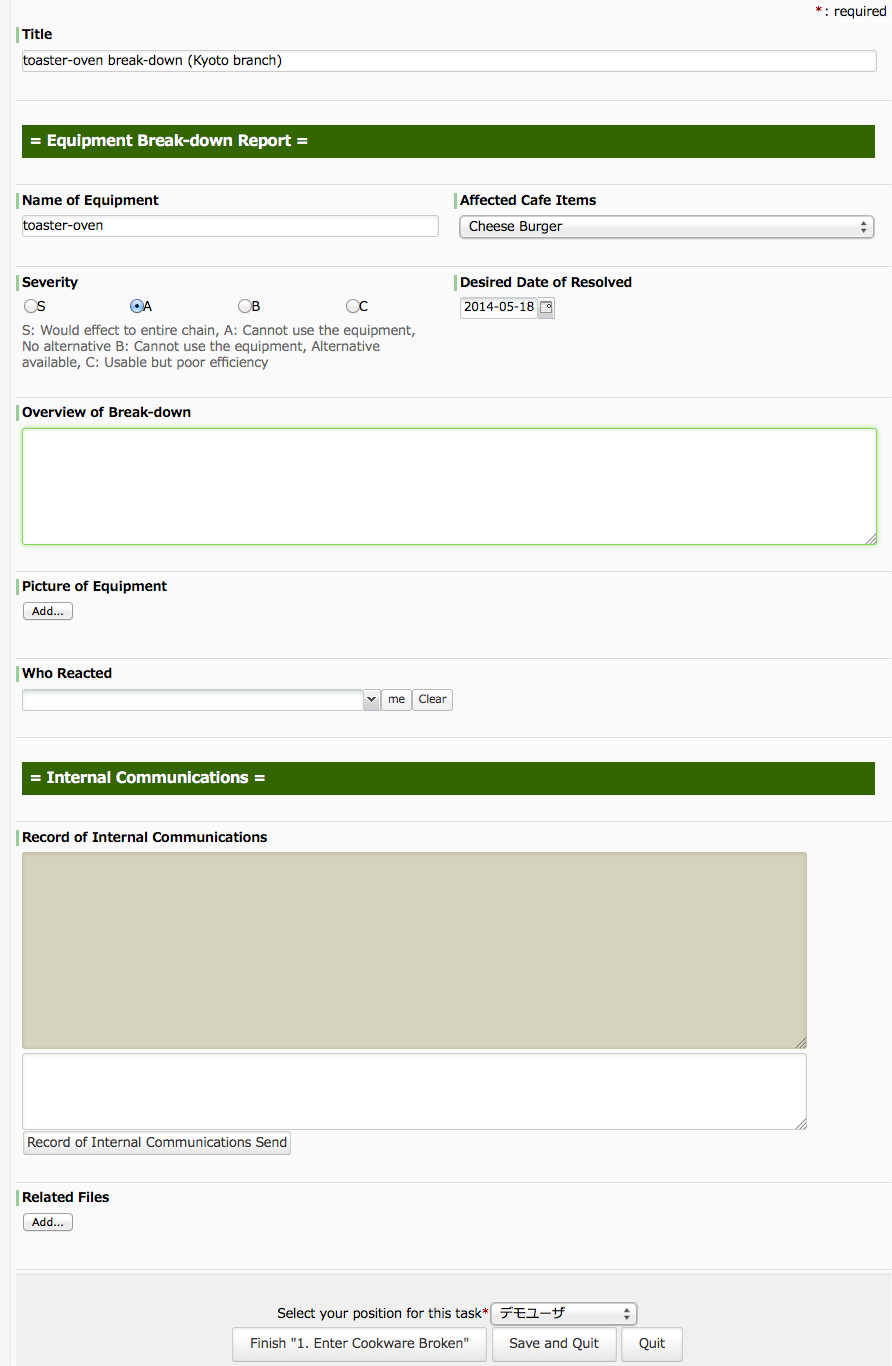
But this time, we consider Choices XML so to speak 'Cross- operational', that to be referred by input forms for other operations. The following is a business flow that each store reporting the "broken cookware" to the headquarter. The reports must include which item is affected by the lack of the cookware.
  • B. Broken Report: Select items affected.

[Broken Cookware Report flow: "1. Enter Cookware Broken" screen]

'Want to collaborate in reply emails'
'Want to visualize the progress of creating reply emails'

A flow of Contact Support is complicated. Many companies have their complicated splitting flows such as, "Escalation", "Technical survey", "Committing to Sales section" or "FAQ registration", etc.. Also, it varies according to the company scale. Even in the same business industry, the flow will be totally different in organization with 10, 100, 1000 personnel. That is, Contact Support operation is one of the businesses that you want to explore "the way it should be" for your own. Nowadays, you better make your attempt to optimize the business flow using a 'Business Process Management tool' (BPM tool).

However, even though 'Modifying and Improving' is the specialty of "BPM tools", they are less good at usability of the input screen. For example, the importance of each item cannot be known even if they have been carefully set to fit the business of the company, because it looks flat.

"Questetra BPM Suite" is equipped with a feature that you can customize 'Input Form screen' exhaustively.
Though you will need knowledge of HTML, you can continue to explore 'an Input screen which anyone can handle' or 'an Input screen that allows quick responding'. That will make even rookie employees to play active roles. (Advanced Layout feature)

[Contact Replying flow]
Field Engineering is a service such as periodical inspections to prevent failure, or repairing occurring failures. Indispensable to sales business of MFPs and control equipments.

In many cases, serviceperson so called 'Custome Engineer (CE)' are dispatched. Incidentally, we Japanese call them 'Service-man', though a strange Japanglish. And I think this word is used only to repair personnel for large appliances or gas appliances, nowadays... (Ah, it was an idle chatter)

The following Business Process allocates jobs to workers (CE), and records the work reports from workers (CE). The biggest purpose is of course "visualization of work progress".

[CE Progress Management flow]