Showing posts with label BPMN. Show all posts
Concerning "Designation in Uneven Hierarchy", we learned methods for "Absolute designation according to the job title, "Relative designation according to organization hierarchy, and "Methods of separating business processes, designating approver".

As the last of this series, I will introduce a past article that describes "Method of separating the starting position according to job position".

Even though it is a similar idea to "Method of separating business processes", it addresses by separating the start position in one business process in this article. Although it is a "method of starting by boss" instead of "method of designating boss", please keep it in your memory as one of the methods of designing a Workflow App for an organization with variations in its hierarchy.

Regarding designation within an organization in which its hierarchy is uneven, we studied "method of absolute specification by job title" in Part 1, and "method of relative designation according to organization hierarchy" in Part 2.

Both methods have advantages and disadvantages, and approver/decision-makers are needed to be careful during operation. After all, in the case of "an organization with unevenness in depth", it is difficult to simply describe business rules.

The easy-to-use and easy-to-operate Workflow (setting method) will also vary depending on the size of the organization or proficiency to business rules/system of the organization members, and so on. Although we will introduce two more Workflows this time, please consider and choose "which description method is easy to operate without misunderstanding" according to the actual situation of each company including those introduced in the past articles.

One way is to separate the Workflows according to the requester.
In other words, if the approval route differs depending on the job title of who made a request, it may be good to separate into different Workflows.

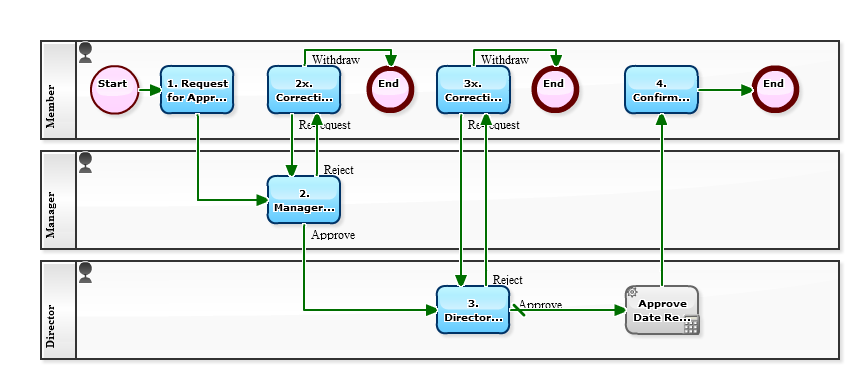
[Approval flow (Separate the request of the Manager)]


Continuing from the last week, let's study about "Operator setting".

In the article of "Episode 587: Designation in Uneven Hierarchy, part 1", I introduced you a method of two-step approval which is to obtain an approval from "superior" then obtain from the "superior's superior". It is a form of approval flow that is common even for other than decision-making. This time, I will introduce a different way of writing about the previous Workflow diagram.

In the following Workflow diagram, the second Swimlane is set to "superior of the applicant" (relative designation), instead of "manager" (absolute designation by position).
By setting like this, "2. Approval/Decision" task will be assigned to the manager of the organization to which the applicant belongs. That is, if a "member" among "two directors, ten managers, and fifty members" makes a request then a "manager" approves on it, and if "manager" makes, "director" approves it.

[Approval flow (relative representation)]


Let's study about "Operator setting" from popular articles of the past.
To specify a "superior" is comparably difficult among settings of a Workflow since there are several ways to do and also it depends on the organization structure. It is better to know various ways of thinking at first.

One President, two (executive) Directors, four managers, and twelve employees.
Suppose that 4 of the "12 employees" are assigned to "directly under the Directors". More specifically,

  • 2 people are directly assigned respectively to the Departments where each of two directors supervises.
  • 2 people are assigned respectively to the Units where each of 4 managers supervises.

Every "Units" are belonging to either of the "Departments", of course. Specifically, It is a case of where the sales manager himself directly directs five sales staff members besides Units under the umbrella of the sales department. And while there are many Units under the affiliation of the manufacturing department, the manufacturing department manager himself is directly supervising five people as quality control staff.


The characteristic of this organizational structure is that there is "variation in depth". It is a common story.

Now, in the case of such "organization having variations in depth", what kind of business flow diagram should be to express the path of escalation in the approval flow? Let's consider how to write according to international standard notation BPMN. The point where to be controversial is how to draw an in-house rule that is "In principle, after the manager approval, the director will make a decision". That is, those five people in each department in this organization have no Manager.


[Approval flow (absolute representation 1)]


Continuing from last week, I will introduce the past articles of "Workflow Sample" concerning the method of Workflow definition using BPMN (Business Process Model and Notation).

BPMN stands for "Model" and "Notation". The Workflow definition written in BPMN can be run as Workflow system on a BPM system. Would you like to learn BPMN and try systemizing your work?

For information on how to write BPMN, please also refer to BPMN Introduction.


In this blog, "Workflow Sample", we introduce you various Workflow definitions of businesses. Since a Workflow definition is drawn using BPMN (Business Process Model and Notation), so it is not only the flow of the business to comprehensible at a glance but also sharing the contents of the business to be easy.

We are going into Golden Week, so I will re-introduce the articles of the past concerning "how to draw BPMN" for the next two weeks. I hope you take those as an opportunity to learn about BPMN which is a notation system for Workflow diagram and how to draw with them.

Ad Hok Flow Without Procedure

Sunday, May 29, 2011
"Ad hoc", a Latinic phrase. There is no specific word or phrase for us Japanese, so we use that as it is.
Then what does it mean? For example, we use them like "ad hoc Network" or "ad hoc working area" and it stands for "not permanent" and/or "temporary measure."

In the category of Workflow (Business Process), there're expressions like "ad hoc Task" or "ad hoc workflow." To say in plain words, they are series of tasks that not fixed who or how to proceed. "Circulation of document" and "Multiple approval" cases are introduced as example. How they should be treated, with [Workflow system]? or with [Group ware]? are discussed.

Theme of eighth installment in the BPMN lecture series is "Designing ad hoc Tasks"

-BPMN lecture series Before-

<Tasks>
1. Task, 2. Task


[BPMN Sample-Ad Hoc <Loop>: "2. Task" screen]

In some cases employees start requesting, in other accountancy start confirming. Yes, business processes in the world are not started from the same occasion. Rather multiple starting occasion (we call "Trigger") should be prepared in most of business processes.

Theme of seventh installment in the BPMN lecture series is "Multiple Triggers."

-BPMN lecture series Before-

<Tasks>
1a. Task, 1b. Task, 1c. Task, 2. Task


[BPMN Sample <Multiple Start>:"1a. Task" screen]

Today is the sixth issue of our "BPMN" series. Let's look at "interrupting" events, or items that cancel the operation of other tasks.
There are several ways to interrupt a flow. Let's look at interrupting flows that include concurrent processing. In other words, interrupting other users' work when multiple users are executing tasks simultaneously.

In the below workflow, users A, B and C simultaneously work on separate tasks within the same process. Now, user A can decide to end the entire process arbitrarily. If user A completes task 2a, then tasks 2b and 2c disappear. (This doesn't have an effect when tasks 2b and 2c are already completed.)

<Tasks>
1. Task, 2a. Task, 2b. Task, 2c. Task

[BPMN <Single Terminate>: "2a. Task" screen]

Eternal Looping

Sunday, May 1, 2011
BPMN Lecture series Vol. 5

Sometimes a workflow will proceed from Task 1, 2 to 3... and then you want to go back to task 1. This is a loop structure. "Graphical Authoring" is the reason why BPM tools can allow loop structures in workflow definitions. One thing you need to be careful of, however, is adding too many loops; the workflow itself might not work properly.

<Tasks>
1. Task, 2. Task, 3. Task, 4. Task, 5. Task

[BPMN Sample <Loop>: "4. Task" screen]

Translate duties are suitable for telecommuting.
Duties given(Inputs) and done (Outputs) are clear, and easy to count Outputs.

Indeed, "Translation workflow" is taken as a theme of BPM activity in early days.
Start with simple workflow model, then improve it gradually into what it should be.


<Tasks>
1.Register manuscript 2.Approval 3.Accept & Deadline 4. Ask Question / Complete 5.Answer Question 6.Confirmation


[Translate-Answering Question-Task split:"4.Questioning/Complete" screen]

Our fourth installment in the BPMN lecture series.
After spending two or three months in business process management activities, you will probably start to want to connect processes in a "primary—secondary" relationship.
In other words, process a1 (model A) can:
  • Start process b1 (model B) [e.g. order acceptance -> production]
  • Start processes b1 and b2 (model B) [e.g. order -> shipping]
  • Start process a2 (model A) [e.g. this month's invoice -> next month's invoice]

The settings depend on what BPMS system you are using; naturally, we'll explain with the functions of Questetra BPM Suite.

Previous BPMN Lecture articles:
<Tasks>
1. Name your child

[BPMN Sample <Generate Child> : "Birth" setting screen]

So we looked at splits, and you already know what tasks are. So, the next step in our BPMN lecture series is "events."
"Events" are steps in a workflow that are not tasks (work) or splits (business rule). This definition probably ruined your intention of reading the rest of the article, so let's try some different definitions.

Here are some representative events:
  1. A human is going to start the process (Normal Start Event)
  2. The clock is going to start the process (Timer Start Event)
  3. We'll start once we get a letter (Message Start Event)
And some more:
  1. We're going to send a letter (Message Throwing Intermediate Event)
  2. We're ending here (Normal End Event)
  3. Everything is finished here, even if there are some incomplete stuff (Terminate End Event)
There are over 60 registered events in the standard BPMN 2.0, but only a few are usually used in BPM systems. Some people may want to utilize all sorts of available events, but that probably won't be the best thing for those trying to read and understand the workflow diagram. The best thing about BPMN is that many people can intuitively understand it, so we're going to be strict and say the above six events are adequate for everyday use.

<Tasks>
1. Task

[BPMN Sample <Message Throwing Never-Ending> : "1. Task" screen]

In last week's "BPMN Lecture" we talked about the "X" and "+" mark split conditions in the lecture titled, "Split Conditions are a Basic Concept in BPMN." Today let's look at the "O" mark.
  • "X" mark [XOR split]: One of the flows
  • "+" mark [AND split]: All of the flows
  • "O" mark [OR split]: Some of the flows
Once you learn how to utilize these three split conditions, you'll be able to handle all of the splits in business processes. (For now, we're going to ignore those voices that say these aren't the only ones. *)

<Tasks>
1. Task, 2abc. Tasks, 3. Task

[BPMN Sample <OR Split> : "1. Task" screen]

We post workflow sample articles on Sundays, too, which is easier said than done.
This Sunday we'll do something different and use it for a BPMN lecture.
BPMN (Business Process Model and Notation) is a "Model" and a "Notation."

The word "Model" may remind you of "organizational models" or "model estimates." Simply put, a model is a simplified version of something. So they don't have to be overly detailed.

How detailed business process models should be defined depends on the workflow system or BPM system that is being used. Most process models include three types of data: flow information, person-in-charge information, and the data set. Today let's look at two types of "split conditions," which are a basic flow information.


Tasks: 1. First Task, 2abc. Second Task, 3. Third Task


[BPMN Sample <AND Split>: "1. First Task" screen]