Showing posts with label Fixed asset management. Show all posts
Oh My Goodness, there is no more stock of printer paper!

The person who used up the last one should tell it to the General Affairs, but people tend to forget to do that.
Or, even though Affairs had been reported, it was not led to ordering.

Well, "Order Management of Office Consumables" is annoying. Nowadays, they would have been received on the day, if they only had reached in 'the ordering'.

The Workflow presented here, it is excellent on the point that anyone can report it to General Affairs in front of the MFP. (Of course, the email address is pasted on the MFP.)
That is, all he or she has to do is to send an email from mobile while waiting for the last paper being printed out. No need to walk to Affairs desk, no need to even type letters of "We've got no more printer paper".

[Used up Stock Report & Ordering flow]


Wireless LAN is convenient, though the initial configurations are troublesome.

" WEP is Dead and WPA implementation", 'MAC addresses limit', 'Multiple SSID operation', 'WLAN access control'... They all sounds complicated, and they comes one after another. Yet, BYOD is "Trend of the times".

* BYOD / Bring Your Own Device.

In this Cloud computing era, it is as a matter of course that 'Information System' is available from anywhere at any time. You cannot take advantage of Cloud Technology with the idea of only protecting your 'Information System' in closed communication network.

Android, iPhone, iPad, Nintendo(?), PSP(!?)...

# Just to mention for a precaution, for an "Information system which requires advanced security", there should be a policy such as can be accessed only from particular room (Security Zone).


To begin with, we would like to establish a application flow for 'MAC addresses* limit'.
Who and when requested connecting from which terminal device? Who and when has approved it? Who and when has configured the connection?
As a matter of course, it is ridiculous that accepting the application in 'papers' or 'email'. Lack of searchability, possibilities of mistakes, and extra labor for inputting. We are going to construct a business process which let the applicant enter the 'terminal device information' into Workflow, and enable to remand if necessary.

* Media Access Control address

[WLAN Connection request [2. Approval] screen]

Basic of consumables management is "purchase approval process" and "using process".
If the Workflow management advances, in addition to the above, "conversion process" you may be tempted to manage as well.

However, when you manage each of them in different processes, so-called "number of stock" will not be recognized. In this article, we would like to think about "supplies purchasing and using applications" which integrates the entire process of "supplies management system". Of course, the quantity of the item become "-1" at the time "using application".

In this way, "the latest log" and "change of stock graph" will be able to be verified any time with Excel download or Google Spread Sheet button. (wonderful!)

Note that if you expand the range of consumable items too much from the beginning, the whole work will not go well. How about starting with 'postage stamps' and 'revenue stamps'?

[Stamp application]

"Auto-sensing Data comes in!" Should we start Inspection right away? (maintenance on Server, vending machine, internal computers...)
It's not a simple story. Maintenance costs rise up if all the detection of sensors had inspected right at the time. It may affect Corporate cost structure. But you cant leave it.
So make "Conditions" if response immediately or not. In this kind of workflow, the most improving point may be to brush up imposing conditions.
similar article;


<Tasks>
1. Inspection Point, 2. Inspection Date, 3. Operation of Inspection Report, 4. Repair Date, 5. Operation of Repair Report, 6.Confirmation


[Maintenance Duty-Receive Inspection Data:[2. Inspection Date] screen]

In the article "Maintenance Duty Certainly Is A Flow", we have introduced simple maintenance duty workflow.

But just think about what made you inspect? Of course periodical does, but also External notification such as claims and tip-offs. It's convenient setting up Workflow to start automatically when receiving Inspection Data.

<Tasks>
1. Inspection Point, 2. Inspection Date, 3. Operation of Inspection Report, 4. Repair Date, 5. Operation of Repair Report, 6.Confirmation


[Maintenance Duty-Receive Inspection Data:[2. Inspection Date] screen]

Maintenance Duties actually is a typical Workflow. It's not all inspection on them. If problems found, they should be repaired to be fixed. And confirmation if the had fixed.
<Tasks>
1. Inspection Point, 2. Inspection Date, 3. Operation of Inspection Report, 4. Repair Date, 5. Operation of Repair Report, 6.Confirmation


[Maintenance Duty-Without Re-examine: "2. Inspection Date" screen]


<Items>
  • Title<<Point>>
-Inspection Point-
  • inspection Point on GoogleMap(string)
  • Ideal Inspection On (date)
  • Summary of Inspection(string: text box 3 lines)
  • Correspondence (discussion)
-Inspection Report-
  • Schedule Inspection On (date)
  • Inspected On (date)
  • Photo Inspecting (file)
  • Inspection Report (string: text box 3 lines)
  • Judgment (select:Need to be Repaired/No Need to be Repaired)
-Repair Report-
  • Schedule Repair On (date)
  • Repaired On (date)
  • Photo Repairing (file)
  • Repair Report (string: text box 3 lines)

By the way, there are some people who reacts strongly against "Flowchart". When you show business flowchart to one of those flowchart allergy patient, you'd better give those words, "I made a picture of how inspection goes. I'll explain on it fine and easy." It focused on let him say "Ah, it's easy than I expected!"
Now, Workflow below enables office workers who settled Inspection Point, to order re-examine after inspection has Reported.

<Tasks>
1. Inspection Point, 2. Inspection Date, 3. Operation of Inspection Report, 4. Repair Date, 4b. Confirmation on Inspection 5. Operation of Repair Report, 6.Confirmation on Repair


<Items>
  • Title<<Point>>
-Inspection Point-
  • inspection Point on GoogleMap(string)
  • Ideal Inspection On (date)
  • Summary of Inspection(string: text box 3 lines)
  • Judgment on Re-examine (select:Need Re-examine/No need Re-examine )
  • Correspondence (discussion)
-Inspection Report-
  • Schedule Inspection On (date)
  • Inspected On (date)
  • Photo Inspecting (file)
  • Inspection Report (string: text box 3 lines)
  • Judgment (select:Need to be Repaired/No Need to be Repaired)
-Repair Report-
  • Schedule Repair On (date)
  • Repaired On (date)
  • Photo Repairing (file)
  • Repair Report (string: text box 3 lines)
Everyone has different standards on when exactly something crosses that "no longer usable" line. This applies to a company's fixed assets as well.

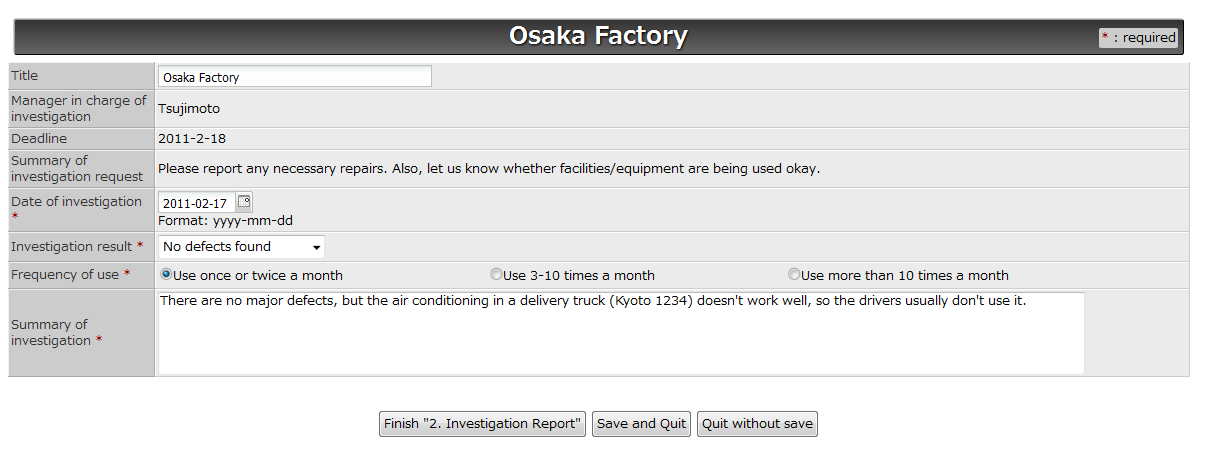
What we are trying to say is that it may be good to have two people conduct the same investigation on fixed assets. These investigations usually don't take that much time, so this should not be unreasonable. (Spin-off from "Taking on Management of IFRS Related Workflows" and "Accommodating Manager Changes in Asset Investigations.")


In yesterday's post, "Taking on Management of IFRS Related Workflows," we presented a workflow for investigating fixed asset management. Companies that have many fixed assets may find that the manager listed in the fixed asset ledger (person in charge of investigation) has changed. If you want to take these cases into account, you can divide the investigation task into two tasks (2a. Start Investigation and 2b. Investigation Report), and enable the first person to assign the second task to another person.


There are tons of workflows related to the International Financial Reporting Standards (IFRS). For instance, IAS 36: Impairment of Assets and IAS 11: Construction Contracts (percentage-of-completion method) require the collection of data from employees.

Today's workflow is for periodically checking whether the company's assets are significantly impaired (finding indications of impairment). In simple terms, conducting checkups to make sure facilities and equipment are operating properly, and this requires employee cooperation.


If a problem is found in the course of inspections, something has to be done. Let's take yesterday's "Workflow for Sending On-the-Scene Photo Reports" and add a task for repairs.


A company's property under fire prevention measures may include automobiles, construction equipment, and fire prevention facilities, and some companies manage their inspection records with photos. With the accelerating spread of wireless connection today, people can take photos on the spot via smartphone, and send them back to the office right then and there. And the boss may be able to ask an employee to make a re-inspection, while the employee is still at or near the site.