"1.Orders" to "2. Delivery", then ... "3. Billing" to "4. Payment"... A flow of the business...

It's for sure, the investment effect by improvement is large on a "Business Process that is not closed to an enterprise". For example, if the corporate structure became to be able to respond faster and less mistakes, business performance will be enhanced naturally.

However...
  • Leaving the processing record of all.
  • Automatically Split the flow according to the attributes of the Issue.
  • Invoice PDF to be generated automatically, rather than manually.
  • The current progress of all Issues to be able to be monitored at any time.

You should not try to define a "Perfect Business Process" from the beginning. The key of business process management activities (BPM activities) is "to start smaller". For example, it would be good to start with partial Steps, instead of entire Steps. For another example, it would also be good to start with ignoring exceptional Issues, instead of all the issues.

The following process diagram is of an "Orders-Delivery-Billing flow" for a Web site design company. Although it seems to be long and large at the first look, but after you looking it for a minute, you will find it "a simple Business Process than you thought". After all, one invoice will be issued on one order registration. In other words, it is not assumed such a case that billing (delivery) is divided into two stages.

Now...suppose the Issues of "double staged delivery" became so frequent that you cannot ignore. What kind of Process improvement can be considered?

[Order-Delivery-Billing flow]

There are plenty of service agreements that are for period of monthly or annual. Contract of insurance, newspaper subscription contract, contract for communication line, contracts with lawyers and tax accountants, contract of Cloud services...

Cases are not rare in the contract of this kind, that require procedures not only on "new contract", but also on "update". On the services for general consumers, many of them are in the pattern of "automatic new contract × automatic update". But on services for enterprises, there are some cases that proposing additional options, or proposing longer period than the previous, or required explanation of the contents of the service over again.
That is the moment that a Sales staff to play the active part, so it should be performed smoothly, efficiently, without mistake nor leakage. And that is for nobody else but the customers.

The following Workflow definition is a Business process for centrally management of procedures of newly contract and contract updating, contract modification of the halfway, together with managing to invoicing / payment confirmation. I could have held a 'workshop seminar for two hours' just to explain this single flow diagram, but roughly speaking, the flow is that 'Sales' inputs the Orders and 'Management division' issues invoices.

[Procedures for Service Start/Extension/Change (Order-Billing)]
'The list of Clients' should be managed in a "Table".

A "table" really is convenient. It makes me tired just to think it is described by only strings, whatever it is "roster" or "Product Master". Understanding of the whole aspect become difficult if it is hard to use the "table" such as 'Legal texts', 'regulations' or 'verbal conversations'. ("Table" = Visual Information Management tool)

It is controversial that how to manage the Master Choice information, when managing 'Commonly used Choices' in the entire system. However, many people would agree that managing in 'Rows' and 'Columns'.

The Workflow below, is to update the 'list of Clients' in the Workflow system. It is also a special Workflow to update the system configuration. As actual operation, managing the "list of Clients" on "Google SpreadSheet" etc., which is a Spreadsheet software, and pasting "Clients ID /Company Name" at the first Step of '1. Enter ID and Company Name'. The excellent point of this business process definition (process model) is that you can determine 'the time to the setting to be effective', and that 'The Setting itself' remains as a record.

[Clients List Updating;'1. Enter ID and Company Name' screen]


I have been introducing the way to use 'Select type Input form' for inputting business data.

First of all, 'Business Data' is roughly divided into (A) the data to be input by referencing the master information, copied and Pasted, and (B) the data to be written freely. Of course, there is no clear boundary between them, but if it is an input form that is close to (A), you should consider using 'Choices'.

That is, input forms (Data item) for 'Account Name', etc., are likely to be judged 'to be managed in Master'.

However, is it good enough with 'Master management only in-house", in this Cloud computing era? Needless to say, it is necessary to companies going to actively adopt "standard classification code" in order to increase the operational efficiency of society as a whole.

Here, as the first step to realize these, we are going to study on a case that adding office code of their own (a ~ f) to the Prefectural Code, which is defined by ISO (International Organization for Standardization). (It won't be an pure ISO code, but will be good enough for data analysis in the future. Coexistence of "operational efficiency of day-to-day"and "data utilization in the future" is quite difficult...)

<Prefectural Code "ISO 3166-2:JP" and Provincial Branch Office>
- a. Sendai branch
01:Hokkaido
02:Aomori, 03:Iwate, 04:Miyagi, 05:Akita, 06:Yamagata, 07:Fukushima
- b. Tokyo head office
08:Ibaraki, 09:Tochigi, 10:Gunma, 11:Saitama, 12:Chiba, 13:Tokyo, 14:Kanagawa
15:Niigata, 16:Toyama, 17:Ishikawa, 18:Fukui, 19:Yamanashi, 20:Nagano
- c.Nagoya branch
21:Gifu, 22:Shizuoka, 23:Aichi, 24:Mie
- d. Osaka branch
25:Shiga, 26:Kyoto, 27:Osaka, 28:Hyogo, 29:Nara, 30:Wakayama
31:Tottori, 32:Shimane, 33:Okayama, 34:Hiroshima, 35:Yamaguchi
- e. Takamatu branch
36:Tokushima, 37:Kagawa, 38:Ehime, 39:Kochi
- f. Fukuoka branch
40:Fukuoka, 41:Saga, 42:Nagasaki, 43:Kumamoto, 44:Oita, 45:Miyazaki, 46:Kagoshima
47:Okinawa


[Selection Form Test/Choice XML Generation;"1. Input Choices Data" screen]

A Workflow needs a [Client Master Data].
How sweet it would be, if 'Company names' were registered without fluctuation.

Brochure Request responding, Visit report, Estimate submission, Order report, Invoice mailing, Contact support,,, Aggregation and analysis on them... Suppose, if there were not for 'fluctuation' in the client name, it would make easier to browse for analysis the basic information for Strategic Planning, such as 'Sales Closing-Rate by Quoted amount and Billed amount' and/or 'The average time between Brochure Request and Purchase Order'. ≪Information≫ obtained from ≪clean data≫ is interminably great. (Even more, if it is big data!)

On the day when the Business process (Business rules and Business procedures) was developed to some degree, you would like to build a [Client Master data] that suites the business characteristics and the size of your company.

Here, we are going to consider in separated two Business flows, 1.)"Request for Client Master Updating" and 2.)"Creating Client Master". That is, separating into a Workflow that employees in any section to report when he or she receives 'Notice of Relocation' or knowing 'Company name change' in the day to day work. The other is a job of Administrative section that updating the Client Master centrally.

Today, we study about a Workflow that a worker can make 1.)"Request for Client Master Updating" within the Business flow of Visit Report to the Boss.

[Visit Reporting flow;"1. meeting Contents' screen]


When you design Business Data input field, you configure [Data types] of Data Items such as 'Numeric' or 'Date'. For example, you would set 'String type (Single line)' for "Customer phone number", 'Numeric type' for "Your Billing total".

Then, what if Data Input field for "Product Name" or "Name of the State"?

Most of the cases, 'Select type' will be set to the Input field. That is, it will save the labor of typing for the operator and will reduce data fluctuation, by using the selectable interfaces such as "Select Box" and "Check Box". (Assisting Data Input)
  <item value="h1" display="Espresso" />
  <item value="h2" display="Americano" />
  <item value="h3" display="Latte" />
  <item value="h4" display="Black Tea" />
  <item value="c1" display="Iced House Blend" />
  <item value="c2" display="Iced Tea" />
  <item value="c3" display="Organge Juice" />
  <item value="c4" display="Lemonade" />
  <item value="c5" display="Soda" />
  <item value="e1" display="Bagel" />
  <item value="e2" display="Oatmeal" />
  <item value="e3" display="Serial" />
  <item value="e4" display="Cheese Burger" />
  <item value="e5" display="Pan Cake" />
  <item value="m1" display="Prix fixe A" />
  <item value="m2" display="Prix fixe B" />
  <item value="m3" display="Prix fixe C" />


However, these Choices must be always maintained in the newest condition.

For instance, it is a same old story that "Renovating the cafe menu of all chain stores" at seasonal change, but it's tricky doing that. Only 'Select type' among the [Data types], needs maintenance.

I have been introducing samples of "How to manage 'Cafe Menu (Choices XML)' centrally" throughout the latest 3 articles.

  • Two article before the last (choices that closed in business):
    "Cafe menu" (Choices XML) is referenced from multiple input field, within a certain business.
  • The article before the last (choices that closed in business):
    "Cafe menu" (Choices XML) is referenced from multiple input field, within a certain business. (+ Filtered Category)
  • The last (Choices used from the entire company):
    "Cafe Menu" (Choices XML) is referenced from the input field of various internal operations.

In this article, we make further consideration of "Maintenance of the Choice data". Now, we study about a Workflow for updating 'Choices XML' which is commonly used by the entire company, using [Service Task], a special automatic processing step for maintenance of Choices.

Incidentally, this "flow of updating the system-common setting" is an act of controlling the < business platform >. It can be said as strengthening of "internal control". That is, it can be said that a workflow system controls the < business > (Business Processing governance associated with IT), but on the other hand, this Business Process definition can be said that it controls further to the fundamental part. (General governance associated with IT)


[Cafe Menu Upgrading: "2. Display Test" screen]

There are great needs for centrally management in the system on the list of Options to be indicated. Subsequent to previous articles of the last and one before the last, we are going to study for the use of 'Optional Choices' in common, over the case of "Cafe menu" in 'restaurant chain business'.
  • one before the last: The same 'Cafe menu' (Choice .XML) is referred by multiple input field (Select type).
  • the last: The same 'Cafe menu' (Choice .XML) is referred by multiple input field (Select type). (+ Narrowing down the options by selecting a category)

In these examples above, 'Optional Choices to be used commonly' are managed in one file (Choices .XML). However, it is just a closed world of "Weekly report business" operation, that managing centrally the list to be indicated on "multiple input forms". In other words, it is just a "Operation oriented" central management.
  • A1. Weekly Report: Select an item that sold well.
  • A2. Weekly Report: Select an item that not sold well.

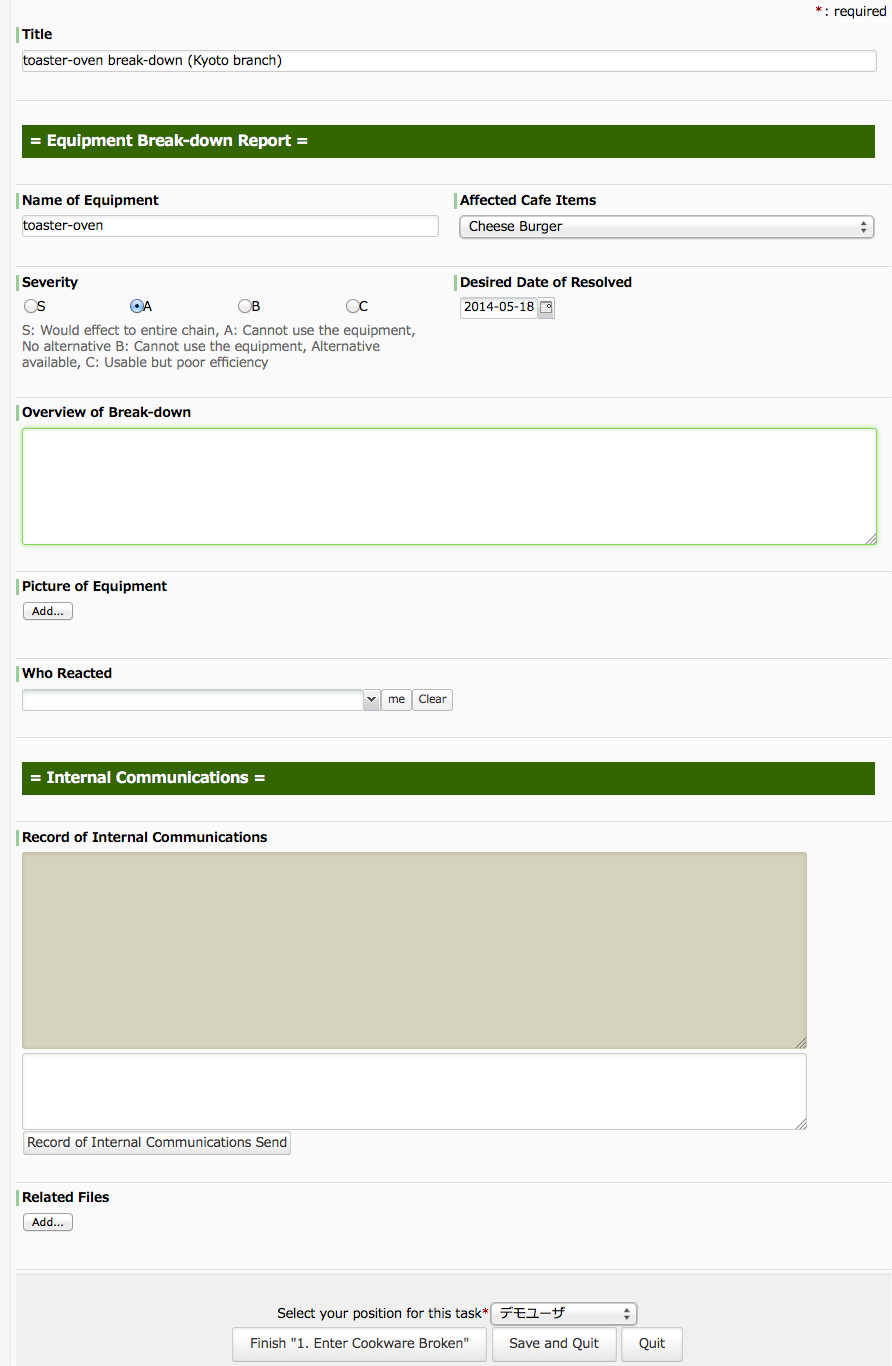
But this time, we consider Choices XML so to speak 'Cross- operational', that to be referred by input forms for other operations. The following is a business flow that each store reporting the "broken cookware" to the headquarter. The reports must include which item is affected by the lack of the cookware.
  • B. Broken Report: Select items affected.

[Broken Cookware Report flow: "1. Enter Cookware Broken" screen]